Swarm Zones
A Swarm Zone groups one or more of your hosts into a single launch target. Choose the zone when launching a game, and Swarm Hosts finds an online machine with enough CPU, memory, and healthy storage.
Network access is selected separately from placement. If a compatible managed relay is available, the launch flow shows it so you can select it without setting up a relay yourself.
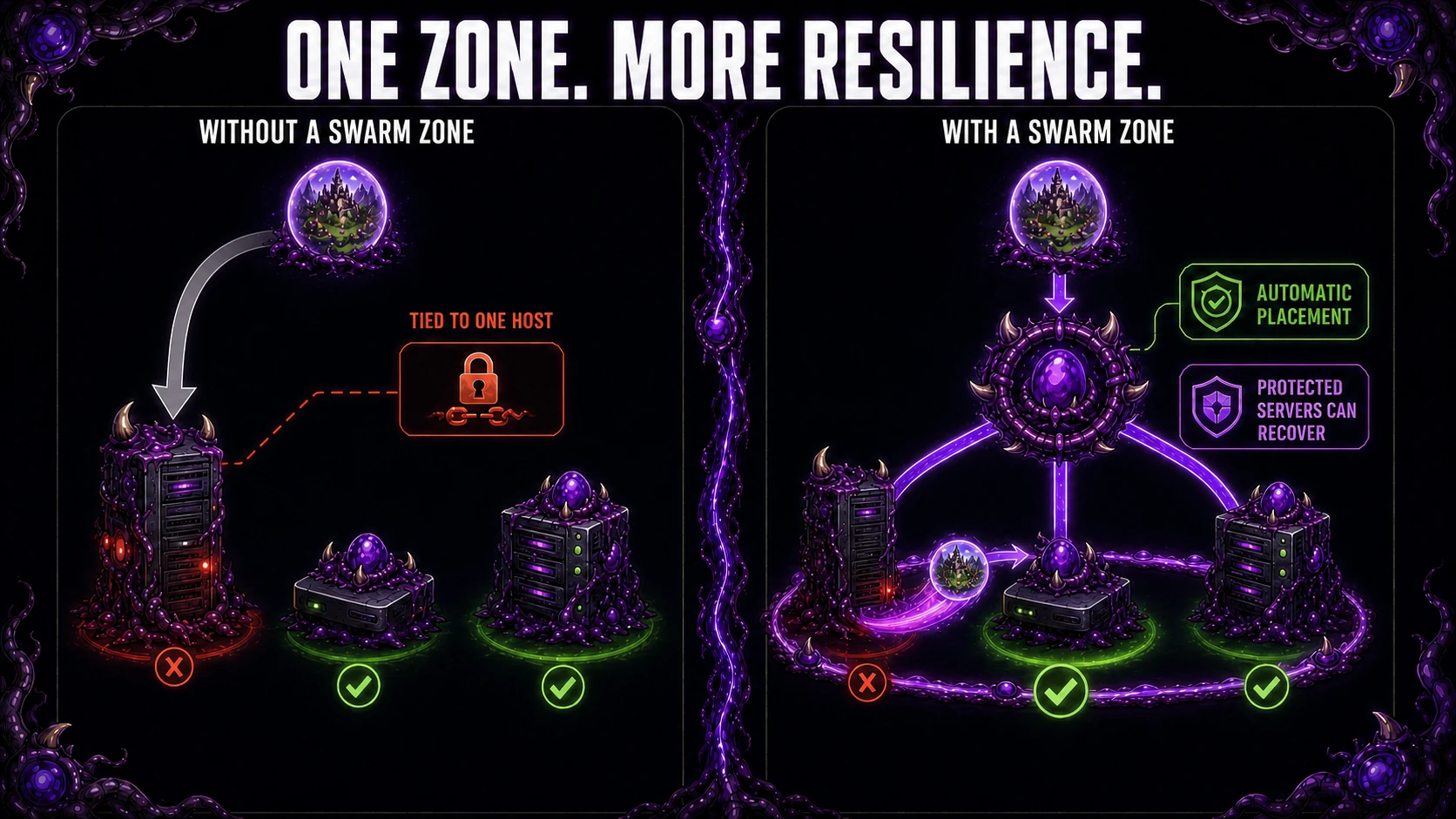
Without a zone, a Swarm Server runs on the individual host selected at launch. With a zone, you deploy to one target and Swarm Hosts chooses an eligible host with available capacity. If you also configure the three-host protection and failover safeguards described below, qualifying protected servers can recover to a healthy peer after a verified host failure.
User-Owned Zone Setup
Use this path when you want Swarm Servers to run on hardware you control.
- Use Profile → Connect a host and the installation guide to register one or more Swarm Hosts you own.
- Open Swarm Zones and create a zone with a name, description, and any registered hosts that are not already part of another Swarm Zone.
- Confirm the zone detail page shows the assigned hosts and zone status.
- Use Manage hosts on the zone page to add or remove hosts later. Existing servers keep running while their zone grouping changes.
- Open Launch a server and choose the Swarm Zone as the Swarm Server target.
Swarm Servers sent to a Swarm Zone are placed automatically. Users do not choose the individual host during launch.
Require replication for the whole zone
Open Zone settings and enable Require 3-copy replication when every active Swarm Server in the zone should use the same protection policy. Enabling this Swarm Zone policy upgrades existing active servers on assigned hosts to 3-copy protection, creates automatic backup schedules, and forces future zone launches to use 3-copy protection regardless of their individual protection choice.
The policy does not make the zone instantly synced. Swarm Sync remains syncing or degraded until each server has produced a fresh snapshot and two other healthy hosts in the zone have verified their copies. A zone needs at least three capable hosts to satisfy the policy; with fewer hosts the policy remains enforced but cannot reach a healthy synced state.
Turning the policy off stops enforcement for future launches. Existing servers keep their 3-copy protection and backup schedules. Turning off zone enforcement does not downgrade them.
Pause automatic backups for the whole zone
In Zone settings, turn off Automatic backups for all servers to pause all automatic backup schedules and backup synchronization for existing and future servers in the zone. This also disables automatic failover. It works even when the zone has fewer than three hosts. Server pages show Paused by Swarm Zone. Individual server settings cannot override this zone-wide pause.
Existing restore points and server schedule settings are preserved. Manual backups and safety backups before changes remain available. Already queued or running backups can finish. Turn the switch back on to allow each server's configured schedules and synchronization to resume; individually paused schedules stay paused. Due schedules may run on the next worker cycle. Automatic failover must be enabled separately and still requires at least three hosts.
Require 3-copy replication controls the protection target; turning it off alone does not stop existing schedules. Use Automatic backups for all servers for the zone-wide pause.
Storage Safety And Backup Synchronization
Open Zone settings to set Minimum free disk from 5% to 50%, or leave it blank to inherit the platform default shown on the page. Hosts inherit the zone's value unless their owner sets a host override under Operations → Storage. New deployments and backups are blocked before they would reduce managed storage below the effective minimum. This setting does not delete data to make room.
Backup synchronization controls new replica synchronization between zone hosts. Turning it off pauses new copies and shows Sync paused; it does not turn off the protection policy or delete existing restore points. Keep it enabled when relying on fresh replicas for recovery.
Automatic Failover
Automatic failover is an opt-in Swarm Zone feature for game servers that need recovery across multiple machines you control. It is deliberately conservative: a missed heartbeat alone does not move a server.
When plan limits are enforced, Free's one-connected-host limit cannot satisfy the required three-host topology. Use an account with Plus host capacity or the equivalent preview access available during Early Access before enabling automatic failover. Check Profile for your current access and limits.
Before enabling it, prepare the zone as follows:
- Assign at least three Swarm Hosts owned by the same account. Each host must report a private IPv4 address that the other hosts can reach on the LAN.
- Enable Require 3-copy replication in Zone settings, or choose 3-copy protection on each server individually. The source host keeps the active data and the other two hosts keep verified backup replicas.
- Keep Backup synchronization enabled and wait for the zone page to show the required hosts and witness addresses as ready. Check each protected server's backup view to confirm both replicas are verified.
- Open Zone settings, enable Automatic failover, and choose the failure grace period and maximum acceptable backup age.
Witnesses ready confirms that the zone's witness requirements are met. Each server also needs a recent backup with two verified copies on healthy zone peers and enough capacity on a surviving host. Check the server's Swarm Sync status before relying on automatic recovery.
Each host also has owner-only Swarm Zone continuity roles under its Operations → Continuity view. Accept Swarm Zone backup replicas controls whether the host can receive replica placements; turning it off drains existing placements during repair when another eligible peer exists. Accept automatic failover restores controls whether automatic recovery may select the host. Manual restores remain available. Existing and newly registered hosts accept both roles by default.
When the control plane stops receiving a host's heartbeat for the configured grace period, it also checks its independent health evidence. Both healthy peer hosts must report that the failed host is unreachable on the LAN. Any reachable vote blocks recovery. This two-witness rule helps distinguish a host failure from a control-plane or internet connectivity problem.
Every witness needs a working system ping utility and LAN firewall rules
that allow its checks. If a host's witness is unavailable, use its reported
reason to correct the utility or network access before relying on failover.
An unreachable target is an outage vote; an unavailable witness cannot vote.
The grace period is the minimum wait before automatic recovery can begin. Checks run periodically, and the actual wait may be longer. A replacement is queued only after the source server is confirmed stopped and blocked from restarting.
Once both peers confirm the outage, Swarm Hosts:
- checks for a recent backup with two verified copies on healthy zone peers;
- asks the original agent to persistently block starts, disable automatic restart, and confirm that the source server is stopped;
- waits for that confirmation before queuing a replacement or moving its relay route;
- restores each eligible server on a surviving host that already has a replica and enough CPU, memory, and storage; and
- labels the replacement as a failover recovery and keeps the original record as recovery history.
Swarm Hosts prefers hosts with fewer active servers when capacity and replica availability allow it. Recovery is from a backup, so players will need to reconnect after the replacement starts.
Missing heartbeats and LAN votes do not prove the old game process has stopped. If the source cannot respond, automatic recovery waits. On the host's Operations → Maintenance page, its owner can choose Recover from backups with reviewed risk after powering off the original host or otherwise preventing its servers from writing. The required acknowledgement also permits an explicit choice to accept unverified exclusion. That choice can produce two divergent worlds and lost saves; Swarm Hosts cannot merge them. Manual recovery uses another eligible host owned by the same owner.
A returning agent stops and disables automatic restart for the original server IDs. Once it confirms all source exclusions, the owner can use Return host to service to accept new placements. The original IDs remain blocked after that action; use the recovered servers. Old agents that cannot confirm source exclusion must be upgraded before automatic recovery or returning to service.
Automatic failover is recovery from the latest verified restore point, not synchronous storage mirroring. Game progress after that restore point may be lost. A server without 3-copy protection, two verified peer replicas, a recent backup, witness quorum, or sufficient survivor capacity is not moved automatically; the zone page shows what needs attention.
LAN snapshot replication
Protected servers use scheduled backup snapshots, normally every five minutes. Check the server's backup schedule for its current interval. This is not continuous mirroring: progress since the latest usable snapshot may be lost if a host fails.
Hosts in the same zone copy backups directly over the local network. Backup contents are encrypted and checked for integrity during transfer; they do not pass through the Swarm Hosts web service or a managed relay. Copies need compatible, online hosts that can reach each other's private LAN addresses.
Current agents can reuse unchanged backup data to reduce later LAN transfers. The first copy transfers the complete backup, and compatible older agents may transfer a complete archive each time. Allow space for restore archives and reusable backup data throughout the retention window. Transfer encryption does not encrypt files at rest; protect the host and disks yourself.
Swarm Hosts regularly checks that replicas are still present and usable. Missing, corrupt, or outdated copies appear in Swarm Sync and are repaired when another eligible peer is available. Backup retention and deletion also clean up the associated peer copies.
Swarm Sync status and zone utilization
The zone page reports one authoritative Swarm Sync state for every active Swarm Server in the zone:
- Synced means every server using 3-copy protection has a recent backup and two distinct, fresh, verified backup copies on healthy same-zone peers. The peers must report the private-LAN replication capability, a private IPv4 address, and a current gateway port.
- Syncing means a first backup or a required peer verification is still in progress and no copy has reported a terminal failure.
- Degraded means a required copy is missing, corrupt, unavailable, on an unhealthy peer, or cannot be counted because part of the agent fleet does not report the required LAN capability.
- Stale means the latest backup exceeded the stricter of the zone recovery limit and the policy-derived sync window, or a previously verified copy was not reverified within the required time.
- Not configured means at least one active server is not using 3-copy protection.
- Empty means the zone has no active Swarm Servers.
- Sync paused means Backup synchronization is turned off for the zone, so new copies are not being synchronized.
The healthy peer-copy count counts each host once. Two copies on the same machine provide only one recovery location. Last complete sync is the latest time at which every active server had verified copies on two other hosts. It remains visible if a previously complete zone later becomes stale or degraded; it shows Not yet if any current server has never completed that two-peer sync.
CPU and memory utilization are weighted across the physical resources reported by fresh hosts. They describe whole-host pressure and are separate from the CPU/RAM capacity an owner delegates to Swarm Servers. Managed storage combines the path-free game and backup filesystem samples reported by each fresh host. If both locations share one filesystem, that capacity is counted once; separate game and backup drives are both included. The page shows host and filesystem coverage and counts configured game or backup locations that are unavailable.
Older agents that do not report managed filesystem telemetry contribute their legacy active-data-filesystem sample. Swarm Hosts uses that fallback only when valid managed telemetry is absent, so a disconnected managed backup drive is shown as unavailable instead of being hidden by an unrelated legacy disk sample. Each metric names how many assigned hosts supplied a fresh usable sample, so a partial aggregate is never presented as full-zone coverage.
To remove a user-owned zone, open Zone settings → Delete zone and review the confirmation. Deleting a zone detaches its hosts and Swarm Servers from the zone; it does not delete the hosts or game servers.
Scheduling Notes
Set the zone's Status to Active to accept new zone launches. Maintenance or Unavailable prevents new placement through that zone. In Zone settings, Least used prefers eligible hosts with less queued work and lower committed CPU; First fit uses the first eligible host.
The scheduler only considers hosts that are online, assigned to the zone, and healthy enough for the requested Swarm Server. It checks available CPU, memory, and storage before placing the game server.
Failover recovery uses the same capacity checks and adds a least-loaded-host preference, so multiple recovered servers are spread across surviving hosts when their replica placement and resources allow it.
A launch to your own zone fails if no eligible host can accept it. A full Demo Region can queue a launch when its queue is available.
Demo Regions
Demo Regions are platform-managed launch targets. Registered users may see an available Demo Region during launch, but cannot inspect its hosts, networking, or other users' Swarm Servers.